Introduction to Planner5D and its features
Are you ready to transform your living space into a dream come true? Planner5D is the tool you’ve been waiting for. Whether you’re an aspiring interior designer or just someone looking to refresh their home, this software offers everything you need to conceptualize and visualize your ideas. With its intuitive design features, anyone can create stunning 3D models of their spaces in no time.
Imagine walking through your future kitchen before it’s even built or rearranging furniture with just a few clicks. Planner5D makes that possible! This powerful platform combines user-friendly tools with advanced capabilities, making it suitable for projects big and small. Dive into the world of virtual designing where imagination meets practicality—let’s explore what makes Planner5D stand out from the crowd.
Are you dreaming of a new space? Maybe you’re ready to revamp your living room or design the perfect kitchen. Whatever your vision, Planner5D might be just what you need to bring those ideas to life. This innovative house design software allows users to create stunning interiors and exteriors with remarkable ease.
With its user-friendly interface and powerful features, anyone can step into the shoes of an interior designer without feeling overwhelmed. From 2D floor plans to immersive 3D visualizations, Planner5D offers tools that cater to both amateurs and seasoned professionals alike. Whether you’re planning a complete renovation or simply exploring possibilities, this software transforms abstract ideas into tangible designs.
Ready to dive deeper? Let’s explore how Planner5D can help transform your space!
User-Friendly Interface and Design Customization Options
Navigating Planner5D is a breeze, thanks to its user-friendly interface. Whether you’re a novice or an experienced designer, you’ll find the layout intuitive and easy to grasp.
The drag-and-drop functionality allows for quick adjustments. This feature empowers users to experiment with layouts without any hassle. You can easily place furniture, change wall colors, or resize rooms with just a few clicks.
Customization options are abundant. From selecting materials to adjusting lighting effects, every detail can be tailored to your vision. Want rustic wood floors? Or maybe sleek modern tiles? The choice is yours.
Moreover, the software includes pre-designed templates that serve as great starting points. These templates cater to various styles and preferences, making it easier than ever for users to create their dream spaces effortlessly.

Advanced Features for Professional Designers and Architects
Planner5D offers a wealth of advanced features that cater specifically to professional designers and architects. One standout tool is the 3D rendering capability, which allows users to visualize their designs in stunning detail. This feature helps bring ideas to life, showcasing textures, lighting effects, and spatial relationships.
A powerful catalog of objects plays a crucial role as well. Designers can access an extensive library filled with real-world furniture and decor items. This makes it easy to create authentic representations of spaces.
Additionally, Planner5D supports collaboration among team members. Projects can be shared seamlessly for feedback or brainstorming sessions.
The software also includes measurement tools that ensure precision in design layouts. These features elevate the planning process from basic sketches to detailed architectural plans, making it ideal for professionals aiming at high-quality outputs without compromising efficiency.
Compatibility with Various Devices and Operating Systems
Planner5D offers remarkable compatibility across various devices, making it accessible for everyone. Whether you’re on a desktop, laptop, or tablet, this software seamlessly adapts to your screen size and operating system.
For those who prefer working on Windows or macOS, Planner5D runs smoothly without any hiccups. The web-based version ensures that users can design their dream spaces directly from their browsers.
Mobile enthusiasts aren’t left out either. The iOS and Android apps bring powerful design tools right to your fingertips. You can sketch ideas while lounging at home or even on the go.
This cross-platform functionality means you can switch between devices effortlessly. Start a project at work and continue it later on your couch without losing progress. Flexibility is key in today’s fast-paced world, and Planner5D delivers just that.
Tips for Making the Most of Planner5D
To maximize your experience with Planner5D, start by exploring the extensive library of pre-designed templates. These can serve as a fantastic foundation for your projects.
Don’t shy away from experimenting with different styles and layouts. Mix and match colors, textures, and furniture to discover combinations that resonate with you.
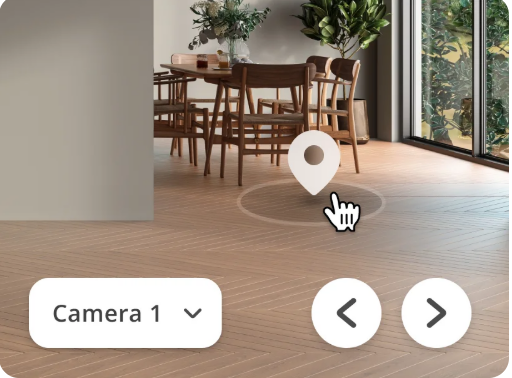
Utilize the 3D view feature to get a realistic sense of space. This perspective can help you visualize how elements interact within your design.
Collaborate with friends or family by sharing your designs for feedback. Fresh eyes often bring new ideas that enhance creativity.
Take advantage of online tutorials and community forums available on their website. They are valuable resources filled with tips and tricks from experienced users who have mastered the software.
Conclusion
When it comes to home design, having the right tools can make all the difference. Planner5D offers a refreshing blend of user-friendliness and advanced features that cater to both novices and professionals alike. Its intuitive interface allows anyone to navigate through spaces effortlessly, while its robust capabilities enable detailed customization for those with more experience.
The compatibility across various devices means you can work on your designs wherever inspiration strikes—whether you’re at home or on the go. Plus, with tips and resources readily available within the platform, users are equipped to maximize their creativity and unleash their full potential.
Planner5D stands out as an exceptional tool in the realm of house design software. Whether you’re working on a personal project or collaborating with clients, it provides everything needed to transform ideas into stunning visualizations. So take a step forward in creating your dream space; this software just might be what you’ve been looking for.